For years, the Signal messaging app has been a favorite for privacy-minded folks. However, it’s not perfect.
404 Media reported this week that the FBI was able to read a suspect’s Signal messages, which should not normally be possible. Signal messages are end-to-end encrypted, meaning only the sender and receiver should be able to read them. They also disappear over time, so as not to leave a trace. In this case, the user had also deleted the app off of their phone.
So, how did the FBI see the messages? By reportedly extracting them from an iPhone’s push notification database, of course. If messages are displayed in a push notification, that technically skirts the whole encryption problem, making it possible for a third party to read them. This is true of any app with push notifications, not just Signal.
Thankfully, per our friends at Lifehacker, there’s an easy way to get around this.
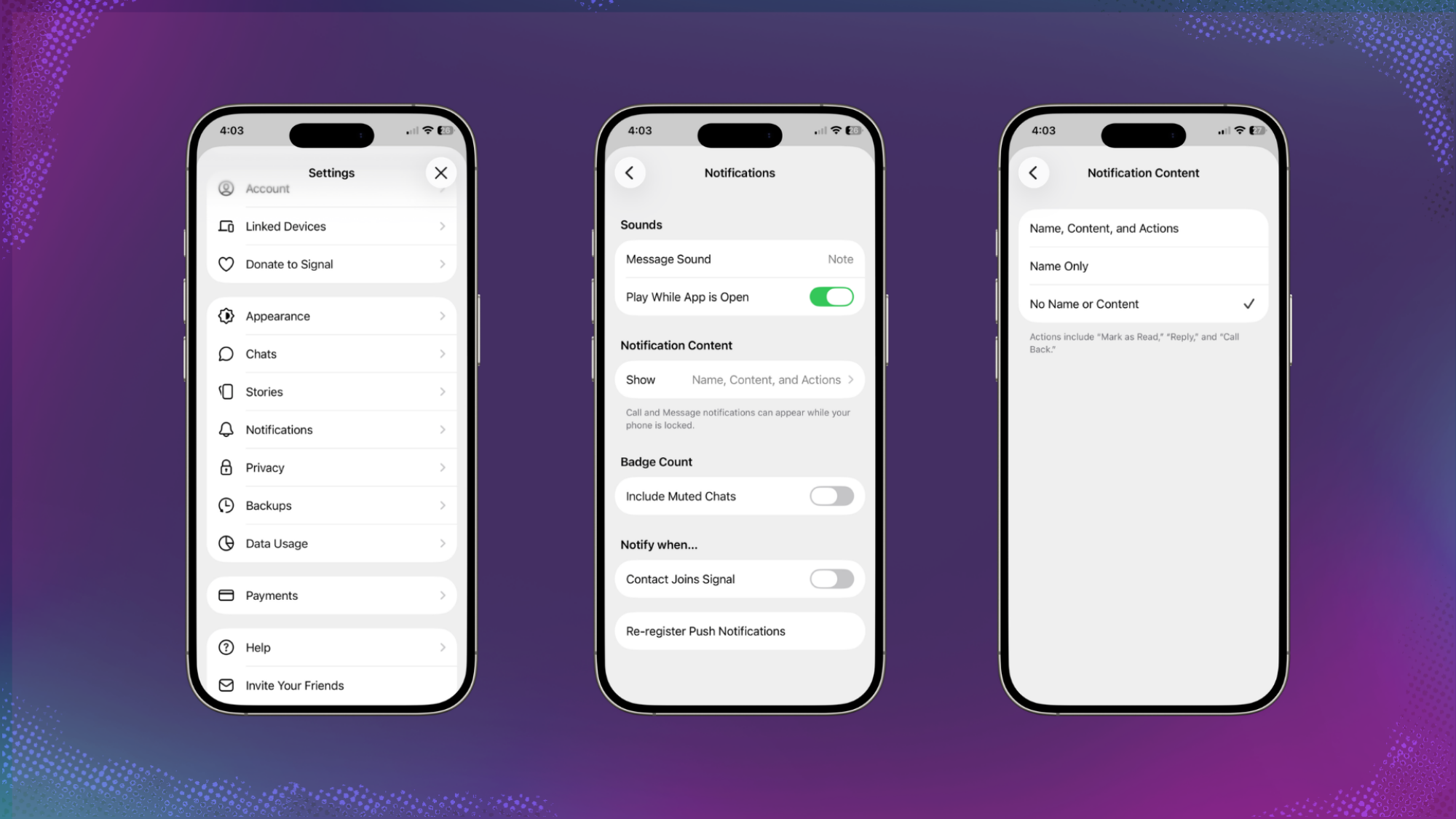
Credit: Mashable / Signal screenshots
Signal has an internal setting that can be accessed in the app’s Settings menu (tap your profile picture in the top left corner). Tap the “Notification” section, then “Notification Content.” Then, choose “No Name or Content” to make it so push notifications do not show any specific information about messages you’ve received.
You’ll still get a notification, but you’ll have to actually open the app to see what the message said, and the FBI won’t be able to take advantage of that loophole anymore.
That seems like something that should maybe be on by default, to be honest.